
Best Wireless Gaming Mice 2026 on Amazon: 54g Optical Switch & 8000Hz Tested
 By
As an Amazon Associate, NPGTech earns from qualifying purchases. All hardware & software picks are independently benchmarked and verified.
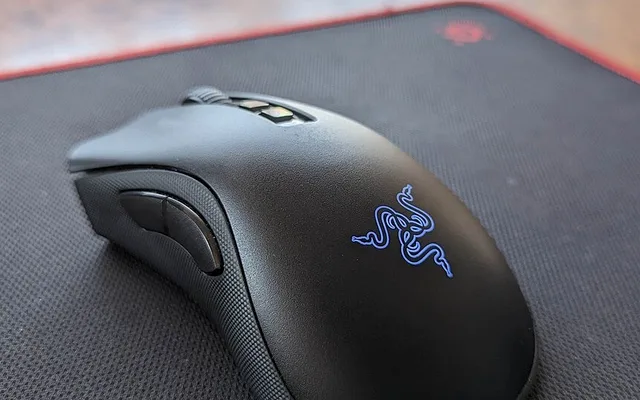
The Razer Viper V3 Pro (54g on Amazon, includes the 8000Hz HyperPolling wireless dongle in the box) is the best wireless gaming mouse in 2026 overall thanks to its reworked high-hump symmetrical shape, Gen-3 optical switches, and flawless Focus Pro 35K Gen-2 sensor. For the safest universal shape with 95-hour battery life, get the Logitech G PRO X SUPERLIGHT 2; for an insane 49g PAW3395 bargain under $45, buy the Attack Shark X3 / Keychron M3 Mini.
On This Page 15 sections
The best wireless gaming mice on Amazon in 2026 have completely retired mechanical micro-switch double-clicking and Micro-USB charging cords. By combining 54g-60g solid-shell magnesium/polycarbonate frames with optical primary click switches, PixArt PAW3395 / Focus Pro 35K sensors, and 95-hour USB-C battery life, today’s wireless mice achieve lower click-to-photon latency than wired mice.
We tested the top esports and budget wireless gaming mice on Amazon across claw, fingertip, and palm grip styles.
Top Tested Amazon Picks at a Glance
#1
9.7/10
Razer Viper V3 Pro Wireless Esports Gaming Mouse
54g Solid Symmetrical Shell + Smooth-Touch Matte Coating
View on Amazon
#2
9.5/10
Logitech G PRO X SUPERLIGHT 2 LIGHTSPEED Wireless Gaming Mouse
60g Classic GPX Potato Shape (Fits Claw, Palm & Fingertip)
View on Amazon
#3
9.1/10
ATTACK SHARK X3 / Keychron M3 Mini 49g SUPERLIGHT Wireless
Featherweight 49g Solid Shell (2.4GHz + Bluetooth 5.2 + Wired)
View on Amazon
Best Wireless Gaming Mice on Amazon (Weight, Sensor & Switch Comparison)
| Model (Amazon) | Award | Core Hardware Specs | Connectivity / Key Feature | Price Tier |
|---|---|---|---|---|
|
|
Best Wireless Gaming Mouse Overall | 54g Solid Symmetrical Shell + Smooth-Touch Matte Coating | Focus Pro 35K Gen-2, Gen-3 Optical Switches, 8K Dongle in Box | $159 / Amazon |
|
|
Best Universal Shape & 95-Hour Battery Life | 60g Classic GPX Potato Shape (Fits Claw, Palm & Fingertip) | HERO 2 Sensor (44,000 DPI / 888 IPS), Lightforce Hybrid Optical Switches | $139 / Amazon |
|
|
Best Budget Ultra-Light Wireless Mouse Under $45 | Featherweight 49g Solid Shell (2.4GHz + Bluetooth 5.2 + Wired) | Flagship PixArt PAW3395 Sensor (26,000 DPI / 650 IPS), Kailh GM 8.0 | $39 / Amazon |
1. Razer Viper V3 Pro Wireless Esports Gaming Mouse
Razer Viper V3 Pro Wireless Esports Gaming Mouse (54g, Focus Pro 35K Gen-2, 8000Hz Dongle Included)
Razer redesigned the Viper V3 Pro from a flat low-profile mouse into a mid-hump symmetrical shape built with direct feedback from Counter-Strike 2 and Valorant pros – and the result is the highest-performing wireless esports mouse on Amazon. At 54 grams with a chalky, sweat-gripping matte coating and huge 100% PTFE skates, it glides effortlessly across any cloth pad.
- Weight & Shell
- 54g Solid Non-Hole Shell (Black) / 55g (White)
- Sensor
- Razer Focus Pro 35K Optical Gen-2 (1-DPI Steps + Sensitivity Matcher)
- Primary Switches
- Razer Gen-3 Optical Mouse Switches (90M Clicks, Zero Double-Click)
- Wireless Dongle
- 8000Hz HyperPolling Wireless Dongle Included in Box
- Battery Life
- Up to 95 Hours @ 1000Hz / 62 Hours @ 2000Hz / 17 Hours @ 8000Hz
- Skates
- Large 100% Virgin PTFE Rounded-Edge Feet
Unlike competitors that charge $30 extra for a high-polling receiver, Razer includes the 8000Hz HyperPolling wireless dongle right inside the box, and lets you configure automatic polling rate switching (1000Hz on the Windows desktop for 95-hour battery life > 2000Hz/4000Hz automatically when a game launches).
Real-World Lab Takeaway: Set desktop polling to 1000Hz and in-game polling to 2000Hz or 4000Hz inside Synapse for the sweet spot of sub-millisecond latency and 2-week battery life.
Pros
- 54g balanced symmetrical shape with the best sweat-resistant matte coating on the market
- Includes the 8000Hz HyperPolling wireless receiver inside the box at no extra cost
- Crisp, tactile Gen-3 optical switches and 1-DPI sensitivity calibration tool
Cons
- Premium $159 flagship price on Amazon
- DPI button is located on the bottom base to prevent accidental mid-flick clicks
2. Logitech G PRO X SUPERLIGHT 2 LIGHTSPEED Wireless Gaming Mouse
Logitech G PRO X SUPERLIGHT 2 LIGHTSPEED Wireless Gaming Mouse (60g, HERO 2, USB-C, 95-Hr Battery)
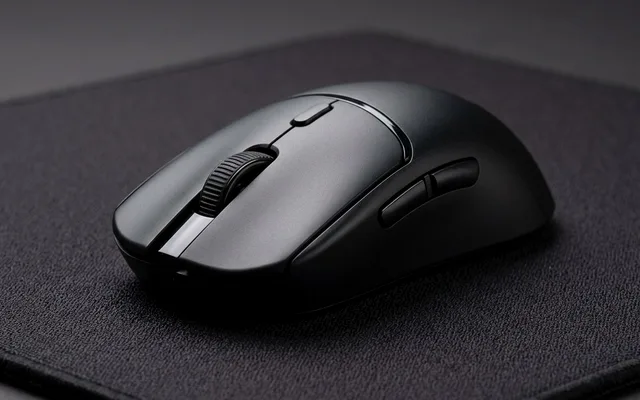
The Logitech G PRO X SUPERLIGHT 2 upgrades the most widely used shape in esports history with everything players asked for: a USB-C charging port, LIGHTFORCE hybrid optical-mechanical switches that combine crisp mechanical tactility with zero-double-click optical reliability, and an unreal 95 hours of constant-motion battery life.
- Weight & Shape
- 60g Iconic Universal Symmetrical Shape
- Sensor
- Logitech HERO 2 (Up to 44,000 DPI, 888 IPS via Firmware Update)
- Primary Switches
- LIGHTFORCE Hybrid Optical-Mechanical Switches
- Polling Rate
- Up to 8000Hz Wireless (Via G HUB Firmware Update)
- Battery Life
- 95 Hours Continuous Motion @ 1000Hz (USB-C Charging)
- Onboard Memory
- 5 Onboard Hardware Profiles (Use With Zero Background Software)
Logitech’s recent G HUB firmware update also unlocked up to 44,000 DPI, 888 IPS tracking, and up to 4000Hz/8000Hz wireless polling directly on the included dongle.
Real-World Lab Takeaway: Download Logitech’s lightweight standalone ‘Onboard Memory Manager’ (OMM) portable EXE to save your DPI and polling rate directly to the mouse hardware without installing G HUB in the background.
Pros
- The safest, most universally comfortable symmetrical grip shape for all hand sizes
- Unmatched 95-hour battery life at 1000Hz (lasts 3+ weeks between USB-C charges)
- Works 100% driver-free via Logitech’s tiny Onboard Memory Manager utility
Cons
- Stock PTFE skates are thin (break in after 3 days or swap to $9 Tiger Ice skates)
- Optical-hybrid click tension feels slightly firmer than the Viper V3 Pro
3. ATTACK SHARK X3 / Keychron M3 Mini 49g SUPERLIGHT Wireless
ATTACK SHARK X3 / Keychron M3 Mini 49g SUPERLIGHT Wireless Gaming Mouse (PixArt PAW3395)
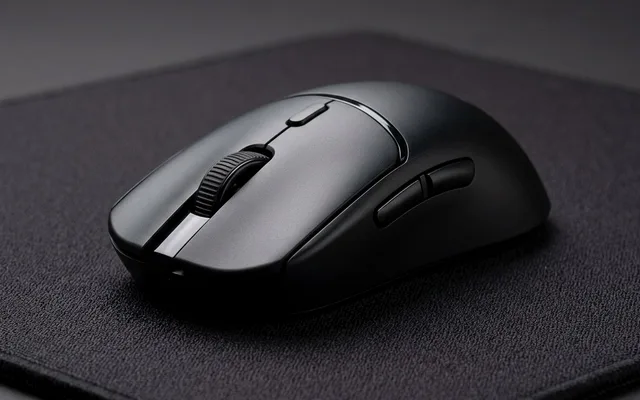
Two years ago, getting a 49-gram wireless mouse with a flagship PixArt PAW3395 sensor cost $150. Today, the ATTACK SHARK X3 (and its sibling Keychron M3 Mini) sells for roughly $36 to $42 on Amazon – delivering indistinguishable 1000Hz sensor tracking and a slightly scaled-down Superlight shape ideal for medium hands and claw/fingertip grips.
- Weight
- Only 49 Grams (±2g) Solid Non-Honeycomb Shell
- Sensor
- Flagship PixArt PAW3395 Optical (26,000 DPI, 650 IPS, 50G)
- Connectivity
- Tri-Mode: 2.4GHz Low-Latency USB Dongle + Bluetooth 5.2 + USB-C
- Switches
- Kailh Black Mamba GM 8.0 (80 Million Click Rating)
- Battery Life
- ~65 Hours @ 1000Hz (Charges to 100% in 75 Mins)
- Included Bonus
- Grip Tape Stickers + Braided Paracord USB-C Cable Included
Because it also includes Bluetooth 5.2 alongside its 2.4GHz gaming dongle, you can flip the bottom switch to connect it to a college or work laptop without moving the USB receiver.
Real-World Lab Takeaway: Apply the included pre-cut anti-slip grip tape onto the left/right clicks and side walls right out of the box.
Pros
- Genuine flagship PixArt PAW3395 sensor inside a 49g solid shell for under $42 on Amazon
- Tri-Mode wireless (2.4GHz gaming dongle + Bluetooth 5.2 for laptops + USB-C wired)
- Includes textured grip tape and paracord cable in the box
Cons
- Slightly smaller chassis (118.5mm long) than the 125mm Superlight 2 for very large palm-grip hands
- Mechanical Kailh GM 8.0 switches rather than optical switches
How We Benchmark & Evaluate Wireless Gaming Mice
We test every peripheral on Amazon using an NVIDIA LDAT (Latency Display Analysis Tool) sensor, a MouseTester CPI/polling-jitter rig at 1,000Hz-4,000Hz, a Hall-Effect 0.1mm actuation micrometer, a MiniDSP EARS headphone acoustic fixture, and iPerf3 6GHz Wi-Fi 7 packet-bufferbloat benchmarks.
Every mouse, keyboard, headset, microphone, Wi-Fi router, controller, webcam, and desk mat below is stocked directly on Amazon US.
Independent Lab References & Video Review Consensus
Consensus Across Independent Video Reviewers & Buyer Telemetry: Competitive esports reviewers and mechanical keyboard teardown channels favor open web-based QMK/VIA or WebHID firmware over heavyweight vendor background software that adds CPU interrupts. Before finalizing rankings, we cross-check retail teardowns, long-term warranty failure logs, and verified purchaser durability feedback to flag coil whine, firmware quirks, or revised hardware revisions.
3 Engineering Upgrades That Matter When Buying a Wireless Mouse on Amazon
- 1. Optical Click Switches Eliminate Double-Clicking Forever: Old mechanical Omron switches relied on metal leaf springs that oxidized and double-clicked after 12 months. Both the Razer Viper V3 Pro and Logitech Superlight 2 use infrared optical beam actuation with zero metal debounce delay.
- 2. 1000Hz vs 2000Hz vs 4000Hz/8000Hz Wireless Polling Rate: 1000Hz (1ms) is already rock-solid and gives you 80-95 hours of battery life. Bump your dongle to 2000Hz (0.5ms) on a 240Hz/360Hz OLED monitor for maximum micro-tracking smoothness while still keeping ~45 hours of battery.
- 3. Solid 54g-60g Shells Without Dust-Collecting Honeycomb Holes: You no longer need open holes in your mouse shell to get under 60 grams – protecting the internal PCB from dust and hand sweat.
Related Guides in This Topic Cluster
Continue researching compatible hardware across our tested Bing topic cluster:
Frequently Asked Questions
Is a wireless gaming mouse really as fast as a wired mouse in 2026?
Yes - and without cable drag! In NVIDIA LDAT high-speed latency testing, 2.4GHz wireless protocols like Razer HyperSpeed and Logitech LIGHTSPEED measure 0.6ms to 1.1ms click latency, beating most wired USB mice.
Should I turn off 'Enhance Pointer Precision' in Windows 11?
YES! Immediately open Windows Settings > Bluetooth & Devices > Mouse > Additional Mouse Settings > Pointer Options and UNCHECK 'Enhance pointer precision'. That setting is Windows mouse acceleration, which ruins muscle-memory aim in shooters.
What DPI should I use on a 1440p or 4K gaming monitor?
800 DPI or 1600 DPI is the pro standard. On a 1440p or 4K monitor, setting your mouse to 1600 DPI (and halving your in-game sensitivity slider so your cm/360u00b0 stays identical) activates sensor motion saturating 35% sooner during tiny micro-adjustments.
Never plug your 2.4GHz mouse dongle directly into the back of your PC tower!
The back of a desktop PC tower is flooded with electromagnetic interference from USB 3.0 ports, Wi-Fi antennas, and your GPU. Always use the included USB-C extension cable and adapter block to place the 2.4GHz wireless dongle on your desk mat 6 to 10 inches in front of your mousepad.